 Tom Moor
281b778b2d
Tom Moor
281b778b2d
* fix: Suspended users should not be included in cached member count for groups

* fix: Defer CounterCache hook registration until model is initialized

The previous test-only no-op hid a timing bug where setImmediate could
fire before the Sequelize instance had registered the related model,
causing "Model not initialized" failures. Poll until the model is
ready, and unref the pending immediate so it does not keep the event
loop alive in environments where the database is never initialized.

Co-Authored-By: Claude Opus 4.7 <noreply@anthropic.com>

* perf: Reduce overhead of group member count invalidation

Select only the groupId column with raw queries and de-duplicate before
issuing Redis deletes, avoiding loading full GroupUser rows into memory
when a user belongs to many groups.

Co-Authored-By: Claude Opus 4.7 <noreply@anthropic.com>

* chore: unref Redis healthcheck interval

Don't keep the Node event loop alive solely for the periodic ping; the
event loop should drain on its own when the application is shutting
down or a Jest worker is finishing.

Co-Authored-By: Claude Opus 4.7 <noreply@anthropic.com>

* refactor: Centralize counter cache key in RedisPrefixHelper

Avoid duplicating the "count:<Model>:<relation>:<id>" string between
the CounterCache decorator and the User suspension hook by routing
both through a single getCounterCacheKey helper.

Co-Authored-By: Claude Opus 4.7 <noreply@anthropic.com>

* fix: Walk to parent transaction when scheduling cache invalidation

Nested savepoints commit independently of their outer transaction, so
afterCommit callbacks attached to the inner transaction may run after
the outer rolls back, or never run at all. Match the pattern used in
Collection, Event, and base/Model and walk to the parent transaction
so the cache invalidation fires after the real outer commit.

Co-Authored-By: Claude Opus 4.7 <noreply@anthropic.com>

---------

Co-authored-by: Claude Opus 4.7 <noreply@anthropic.com>

A fast, collaborative, knowledge base for your team built using React and Node.js.
Try out Outline using our hosted version at www.getoutline.com.





This is the source code that runs Outline and all the associated services. If you want to use Outline then you don't need to run this code, A hosted version of the app is offered at getoutline.com. You can also find documentation on using Outline in our guide.
If you'd like to run your own copy of Outline or contribute to development then this is the place for you.
Installation
Please see the documentation for running your own copy of Outline in a production configuration.
If you have questions or improvements for the docs please create a thread in GitHub discussions.
Contributing
Note: Please do not submit AI-generated pull requests. We receive a high volume of mass, low-quality PRs generated by AI tools like Claude, ChatGPT, and Copilot from contributors who are unfamiliar with the codebase. These PRs are almost never mergeable and waste maintainer time reviewing them. If you’d like to contribute, please take the time to understand the codebase and write your changes thoughtfully.
Before submitting a pull request you must discuss with the core team by creating or commenting in an issue on GitHub – we’d also love to hear from you in the discussions. This way we can ensure that an approach is agreed on before code is written and that you have read these instructions. This will result in a much higher likelihood of your code being accepted.
If you’re looking for ways to get started, here’s a list of ways to help us improve Outline:
- Translation into other languages
- Issues with
good first issuelabel - Performance improvements, both on server and frontend
- Developer happiness and documentation
- Bugs, quality fixes, and other issues listed on GitHub
Development
There is a short guide for setting up a development environment if you wish to contribute changes, fixes, and improvements to Outline.
Architecture
If you're interested in contributing or learning more about the Outline codebase please refer to the architecture document first for a high level overview of how the application is put together.
Debugging
In development Outline outputs simple logging to the console, prefixed by categories. In production it outputs JSON logs, these can be easily parsed by your preferred log ingestion pipeline.
HTTP logging is disabled by default, but can be enabled by setting the DEBUG=http environment variable. logging
can be enabled for all categories by setting DEBUG=* or for specific categories such as DEBUG=database and LOG_LEVEL=debug, or LOG_LEVEL=silly for very verbose logging.
Tests
We aim to have sufficient test coverage for critical parts of the application and aren't aiming for 100% unit test coverage. All API endpoints and anything authentication related should be thoroughly tested.
To add new tests, write your tests with Jest and add a file with .test.ts extension next to the tested code.
# To run all tests
make test

# To run backend tests in watch mode
make watch
Once the test database is created with make test you may individually run
frontend and backend tests directly with jest:
# To run backend tests
yarn test:server

# To run a specific backend test in watch mode
yarn test path/to/file.test.ts --watch

# To run frontend tests
yarn test:app
Migrations
Sequelize is used to create and run migrations, for example:
yarn db:create-migration --name my-migration
yarn db:migrate
yarn db:rollback
Or, to run migrations on test database:
yarn db:migrate --env test
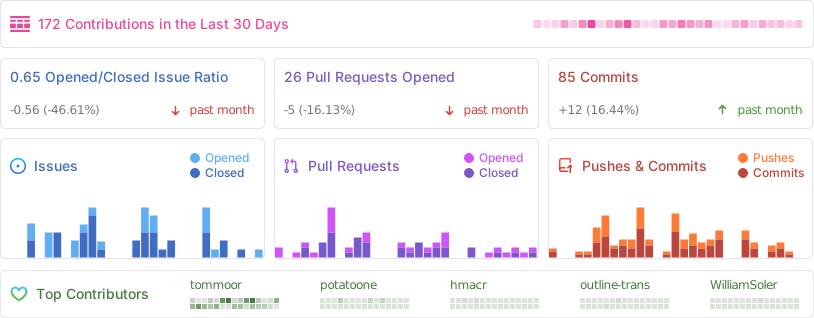
Activity
License
Outline is BSL 1.1 licensed.